

If you are planning to learn Structural Engineering Software, one of the most common questions is: which software should you study first, ETABS, SAP2000, SAFE, or STAAD Pro?
The short answer is: start with ETABS if your main interest is building design; start with SAP2000 if you want a broader foundation in structural analysis; start with SAFE if you are focusing on slabs and foundations; and start with STAAD Pro if your academic program, employer, or local industry relies heavily on it.
However, the better answer depends on your career goals, your current level of structural knowledge, and the kinds of projects you want to work on.
These four programs are all powerful, but they are not identical. Each one was developed with different strengths in mind.
Trying to learn all of them at once usually leads to confusion. A smarter approach is to begin with the one that best matches your target work, build confidence in structural modelling concepts, and then expand to the others.
In this engineering article, we will compare ETABS, SAP2000, SAFE, and STAAD Pro practically.
We will look at what each piece of software is used for, who should learn it first, and which sequence makes the most sense for students, fresh graduates, and practising engineers.
Recommended Articles
- Best Structural Analysis Software for Civil Engineers In 2026
- Best Engineering Universities in Africa: The Ultimate Guide to Programs, Funding, and Fellowships
- Pre-Qualification For Contractors: The First Step to Project Success
- The Definitive Guide to Civil Engineering & Technology 2026
- The 2026 Ultimate Guide to Foundation Engineering Interview Questions and Answers
Why the “study first” question matters
Many learners assume that software proficiency is just about knowing where to click. In reality, Structural Engineers Software is only useful when you understand what happens behind the interface.
Loads, load combinations, stiffness, boundary conditions, meshing, member releases, diaphragms, nonlinear effects, design parameters, and code interpretation (such as BS, IS) all affect the final output.
That is why choosing the right first Structural Engineers Software matters. Your first program will shape how you think about structural systems.
If the software aligns with your goals, you will learn faster and retain more. If it does not, you may spend weeks learning features you do not need yet.
For example:
- A student interested in multi-story building design may benefit most from ETABS first.
- Someone wanting to understand general structural behaviour across different forms may prefer SAP2000 first.
- A learner focused on raft foundations, slabs, mats, and footings should spend time with SAFE.
- A graduate entering a company where STAAD Pro is standard may need to prioritise STAAD Pro, even if another tool seems more intuitive.
So the best software to study first is not always the “best” software overall. It is the software that gives you the strongest early career advantage.
Structural Software Ecosystem Overview
Before diving into individual platforms, it helps to understand the market layout. The four major programs discussed here are produced primarily by two industry giants: Computers and Structures, Inc. (CSI) and Bentley Systems.
CSI produces three programs in this lineup: SAP2000, ETABS, and SAFE. Rather than creating one massive program that does everything poorly, CSI engineered an interconnected ecosystem of highly specialised tools that communicate with one another.
On the other side sits Bentley Systems with STAAD Pro, a comprehensive, generalist platform that aims to handle a wide range of structural configurations in a single environment.
Structural Engineers Software Landscape
| CSI ECOSYSTEM (Specialized, Modular) | BENTLEY SYSTEMS (All-in-One Generalist) |
| ETABS (Buildings & Towers) SAFE (Slabs & Foundations) SAP2000 (General Structures) | STAAD Pro (Heavy Industrial, Steel Plants, Infrastructure) |
ETABS: The High-Rise and Building Master
If your career goal involves designing multi-story apartment buildings, commercial office towers, mixed-use complexes, or glittering skyscrapers that define urban skylines, ETABS (Extended Three-Dimensional Analysis of Building Systems) is your starting line.
Core Philosophy & Strengths
As one of the Structural Engineering Software, ETABS is not just a general finite element tool; it was built from the ground up with an explicit, unyielding focus on buildings.
The program natively understands architectural language. Instead of forcing you to think in terms of abstract nodes, global coordinate points, and raw solid elements, ETABS allows you to model using practical concepts like stories, grid lines, bays, columns, beams, diaphragms, piers, and spandrels.
This specialised architecture gives ETABS an unmatched speed advantage when modelling buildings. For example, you can define a “typical floor” layout once, and ETABS can automatically replicate it across a 50-story tower model in seconds.
Key Technical Capabilities
As one of the Structural Engineering Software, the following are the key capabilities of ETABS:
- Lateral Load Generation: ETABS features robust, automated engines to generate complex lateral loads. It can calculate wind pressure distributions and seismic base shear forces directly based on international design codes (such as ASCE 7, Eurocode 8, and IS 1893) by simply inputting basic site parameters like wind speed, soil class, and seismic zone factors.
- Shear Wall and Core Design: For tall buildings, reinforced concrete shear cores are essential to resist lateral wind and earthquake forces. ETABS allows engineers to assign “Pier” and “Spandrel” labels to walls, enabling the software to generate clear, actionable internal forces and rebar designs for complex wall geometries.
- Massive Object Libraries: It features highly optimised tools for modelling composite steel-concrete floor decks, concrete slabs, and moment-resisting frames.
The Learning Curve & Industry Status
The learning curve for ETABS is highly rewarding for beginners because the interface feels intuitive if you understand building construction.
It is universally regarded as the global gold standard for building design. Walk into a structural design firm in New York, Dubai, London, or Dar es Salaam, and if they are designing a 15-story concrete or steel building, ETABS is almost certainly their primary analytical engine.
Why learn it?
As one of the Structural Engineering Software, ETABS (Extended Three-Dimensional Analysis of Building Systems) is the global gold standard for the analysis and design of multi-story commercial and residential buildings.
Unlike general finite element software, ETABS is explicitly tailored for buildings. It understands concepts like “stories,” “diaphragms,” “piers,” and “spandrels” natively.
If you walk into a structural engineering consultancy that designs high-rises, residential blocks, or office towers, ETABS is almost certainly their primary tool.
SAP2000: The General-Purpose Physics Engine
If ETABS is a precision instrument designed specifically for buildings, SAP2000 (Structural Analysis Program) is the raw, unrestricted heavy machinery of the structural engineering world.
First released in the 1970s, SAP2000 is the foundation upon which CSI built its entire software empire.
Core Philosophy & Strengths
As one of the Structural Engineering Software, SAP2000 is a general-purpose finite element analysis platform. It makes zero assumptions about what you are trying to design.
It does not know what a “story” or a “spandrel” is. To SAP2000, every structure on Earth is an assembly of mathematical nodes, line elements (frames), area elements (shells), and solid elements operating within a 3D coordinate space.
Because it makes no assumptions, it has no architectural limitations. It can model absolutely anything that can be engineered.
Key Technical Capabilities
As one of the Structural Engineering Software, here are the key capabilities of SAP2000:
- Non-Linear and Dynamic Analysis: SAP2000 is an absolute powerhouse in advanced analysis capabilities. It easily handles non-linear buckling analysis, time-history analysis (simulating an actual recorded earthquake wave ripping through a structure), blast loading, and progressive collapse analysis.
- Complex Geometries: It is the tool of choice for structures with complex or curved geometry, such as stadium roof trusses, spatial domes, cable-stayed or suspension bridges, storage tanks, dams, and industrial silos.
- Moving Loads: SAP2000 features a dedicated moving load engine, making it excellent for analysing bridge structures subjected to complex vehicular wheel-load configurations.
The Learning Curve & Industry Status
As one of the Structural Engineering Software, SAP2000 has a significantly steeper learning curve than ETABS. Because the software does not provide building-specific templates, you must manually define boundary conditions, local axes, and finite element mesh densities.
It is widely used in heavy industrial sectors, oil and gas infrastructure, bridge design consultancies, and academic research institutions.
When to learn it?
As one of the Structural Engineering Software made by CSI, SAP2000 is a general-purpose finite element analysis program. Think of it as the raw engine behind ETABS, but without the building-specific limitations.
SAFE: The Foundation Specialist
No structure can stand without interacting with the ground beneath it. While ETABS and SAP2000 are excellent at analysing upper superstructures, they are not optimised to handle the intricate, local behaviours of concrete slabs resting on flexible soil. That is where SAFE comes in.
The Workflow:
| The CSI Working Workflow |
| Step 1: Model & analyse superstructure lateral loads in ETABS Step 2: Export base column reactions and node displacements directly from ETABS Step 3: Import reactions into SAFE to design mat foundations, slabs, and rebar layouts |
Core Philosophy & Strengths
SAFE specialises in reinforced and post-tensioned concrete slabs and foundation systems. It treats structures from a slab-centric perspective, applying sophisticated plate-bending finite element theory to analyse how concrete surfaces bend, shear, and crack under load.
Key Technical Capabilities
As one of the Structural Engineering Software, the Key technical capabilities of SAFE include:
- Comprehensive Foundation Design: SAFE is the industry’s go-to for modelling complex subterranean foundation systems. It can model simple isolated pad footings, combined footings, strap footings, and massive, thick mat (raft) foundations.
- Soil-Structure Interaction: It models soil behaviour using subgrade modulus factors (often modelled as a grid of compressible springs beneath the concrete), allowing engineers to see realistic soil pressure distributions and settlement behaviours.
- Post-Tensioned (PT) Slabs: For modern commercial buildings utilising post-tensioned concrete to achieve long spans and thin profiles, SAFE features dedicated tools to lay out PT tendons, calculate stressing losses, and verify initial and long-term concrete stresses.
- Punching Shear Verification: One of the most common failure modes in flat slab construction is a column punching directly through the slab. SAFE automatically runs rigorous punching shear checks at every column location and designs perimeter shear reinforcement (stud rails or stirrups) where needed.
The Learning Curve & Industry Status
Because SAFE focuses heavily on 2D surfaces and foundations, its interface is lean and highly accessible. It is rarely used as a standalone application; instead, it is utilised as an essential companion tool.
The standard professional workflow involves analysing a multi-story building in ETABS, exporting the base column reactions, and pulling them directly into SAFE to design the foundation system.
Why learn it second?
As one of the Structural Engineering Software, SAFE is created by the same company as ETABS (Computers and Structures, Inc. – CSI).
It is specialised exclusively for concrete floor slabs and foundation systems (mats, isolated footings, combined footings, and sleek post-tensioned slabs).
STAAD Pro: The Industrial Workhorse
Produced by Bentley Systems, STAAD Pro (Structural Analysis and Design Program) is one of the oldest, most widely deployed structural design programs in the world. It stands as a direct, all-in-one competitor to the entire CSI suite.
Core Philosophy & Strengths
Like SAP2000, STAAD Pro is a generalist finite element program. However, over decades of market dominance, it has carved out a massive, unshakeable niche in the heavy industrial steel sector.
While you can model concrete buildings in STAAD Pro, the software truly shines when dealing with frame structures made of structural steel sections, such as warehouses, refinery pipe racks, offshore drilling platforms, manufacturing plants, and utility towers.
Key Technical Capabilities
As one of the Structural Engineering Software, here are the key capabilities of STAAD Pro:
- Industrial Steel Design Optimisation: STAAD Pro features an exceptional steel design wizard. It can analyse a massive industrial frame, check every single member against international steel codes, and automatically run optimisation loops to suggest the lightest, most cost-effective steel sections that safely pass stress requirements.
- OpenSTAAD API: One of STAAD Pro’s greatest strengths is its open application programming interface (API). This allows engineers to write custom macro scripts in Excel or Python to automatically generate models, extract analysis data, and link STAAD directly to internal corporate design spreadsheets.
- Physical Modelling Environment: Modern versions feature a physical modelling workflow that separates the physical structural members from the analytical finite element mesh, reducing modelling errors common in old-school node-to-node configurations.
The Learning Curve & Industry Status
STAAD Pro’s user interface has undergone numerous overhauls, but it still retains an old-school, data-driven backbone that can feel intimidating to beginners compared to ETABS’ sleek, visual menus.
Despite this, its industry footprint is massive. It is incredibly dominant across India, the United Kingdom, parts of the Middle East, and within specific heavy industrial, energy, and power sectors globally.
When to learn it
As a Structural Engineering Software, STAAD Pro (by Bentley) is a direct competitor to both SAP2000 and ETABS.
It is a highly capable generalist software with an enormous footprint in industrial steel design (plant structures, pipe racks, warehouses) and infrastructure.
Detailed Software Head-to-Head Comparison
To help visualise exactly how these options contrast across practical criteria, refer to this breakdown:
| Metric | ETABS | SAP2000 | SAFE | STAAD.Pro |
| Primary Specialization | Multi-story commercial & residential buildings. | Bridges, industrial complexes, and non-building structures. | Concrete floor slabs and foundation systems. | Industrial steel structures, plants, and warehouses. |
| Structural Modelling Focus | Story-by-story building geometries. | Abstract finite element networks (Nodes/Elements). | 2D plate bending and foundation mat systems. | 3D space frames and industrial truss networks. |
| Greatest Strength | Speed of building creation and shear wall detailing. | Advanced non-linear analysis and geometric freedom. | Soil-spring interaction and punching shear design. | Steel member weight optimization and open API scripting. |
| Weakest Area | Poorly suited for irregular, non-vertical shapes (e.g., domes). | Cumbersome for setting up routine multi-story building grids. | Incapable of analyzing full 3D lateral building superstructures. | Less intuitive concrete building modeling than ETABS. |
| Typical Target Structure | 40-story office tower, residential apartment blocks. | Cable-stayed bridge, football stadium roof, industrial silo. | Post-tensioned floors, mat foundations for towers. | Oil refinery pipe rack, mining processing plant, steel warehouse. |
Comprehensive Decision Matrix: Where Should You Start?
Determining which program to open first comes down to aligning the software’s specialisation with your professional goals.
Step 1: Align with Your Career Path
Your technical sub-discipline is the strongest indicator of which program will yield the highest return on investment for your study hours.
- The Urban Residential/Commercial Path: If you want to work for a commercial consulting firm designing residential blocks, hotels, office buildings, or mixed-use urban structures, start with ETABS. It is the undisputed industry standard for this work.
- The Industrial/Energy Path: If you want to break into heavy industry—designing oil and gas refineries, mining facilities, power plants, factory warehouses, or chemical processing structures—start with STAAD Pro.
- The Infrastructure/Specialist Path: If you are drawn to infrastructure projects like bridges, dams, transport hubs, or complex architectural geometry (like shell roofs or stadiums), start with SAP2000.
- The Geotechnical/Foundation Sub-Speciality: If you want to focus heavily on the interface between structures and soil, master SAFE—but make sure to pair it with ETABS, as they are rarely separated in a professional workflow.
Step 2: Consider Regional Market Control
Software dominance is heavily tied to geography. Before committing to a learning path, open up job boards (like LinkedIn or local employment portals) in the specific city or country where you intend to work. Search for “Structural Engineer” and analyse the text.
- The Middle East, Southeast Asia, and parts of Africa: ETABS and SAFE hold a strong grip on the urban design market, while STAAD Pro is in high demand for industrial infrastructure projects.
- India and the United Kingdom: STAAD Pro maintains a massive legacy footprint across both general commercial and industrial consultancies, though ETABS has gained substantial ground for high-rise residential projects.
- North America: The market is fragmented. Large building firms prefer the ETABS/SAFE workflow, industrial/infrastructure firms use SAP2000 or STAAD Pro and mid-sized firms frequently rely on alternative suites like RISA-3D or RAM Structural System.
The Definitive Learning Roadmap for Beginners
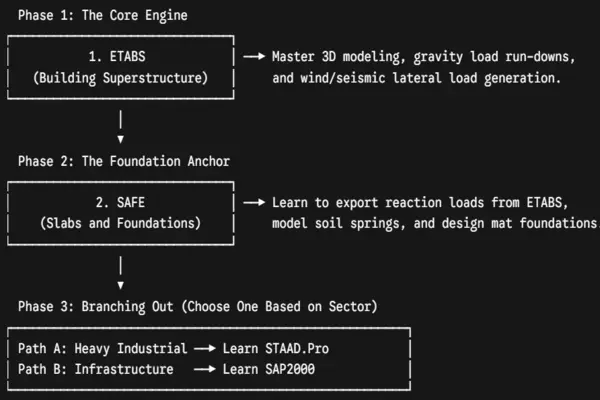
For the vast majority of civil and structural engineering students, the most logical, versatile, and high-yielding software to study first is ETABS.
Learning ETABS first provides an accessible entry point because its interface mirrors real-world building terminology.
Once you master the fundamentals of structural modelling in ETABS, those concepts translate directly to other platforms.
Here is the ideal sequential learning roadmap designed to build a comprehensive, highly employable design skill set:
A Critical Warning: The “Black Box” Trap
The most dangerous thing in structural engineering is a fresh graduate who knows which buttons to click in ETABS or STAAD Pro but does not understand the underlying structural engineering principles.
| THE “BLACK BOX” RISKS |
| Incorrect Member Orientations: Torsional Instability Unchecked Deflection Limits: Concrete Cracking Misunderstood End Releases: Catastrophic Collapse |
Structural engineers‘ software is nothing more than a fast calculator. It operates on the strict principle of Garbage In, Garbage Out.
If you model a beam but forget to release its end moments correctly, or if you input an incorrect seismic response modification coefficient, the software will still run.
It will flash a green light, solve thousands of simultaneous equations, and output a design. But that design could be structurally deficient, leading to severe cracking, costly site retrofits, or catastrophic failure.
How to protect yourself from the trap
- Never skip hand checks: Before trusting a complex 3D computer model, run a simplified, back-of-the-envelope hand calculation. Use the tributary area method to check column loads.
- Master structural behaviour: Understand the difference between a fixed connection and a pinned connection. Understand how load distributes based on structural stiffness—load always chases stiffness.
- Read the design codes: Do not rely on the software to know the code rules for you. Read the actual text of the code (BS 8110, ACI 318, Eurocode 2, AISC 360, etc.) to understand why the software is calculating a specific rebar spacing or steel member capacity.
Frequently Asked Questions (FAQs)
Q1: Is it worth learning AutoCAD or Revit before learning ETABS and STAAD Pro?
A: Yes, absolutely. AutoCAD and Autodesk Revit are drafting and Building Information Modelling (BIM) tools used to create the construction drawings that contractors use on-site. In a professional design consultancy, engineers do not usually deliver software model files to clients; they deliver structural drawings. Knowing how to read, modify, and generate drawings in AutoCAD or Revit is an essential prerequisite that allows you to understand how structural elements physically fit together before you try to analyse them in ETABS.
Q2: Can I use SAP2000 to design a multi-story building?
A: Yes, you can. Because SAP2000 is a general-purpose finite element program, it can analyse any structure, including a multi-story building. However, doing so is highly inefficient. In SAP2000, you would have to manually define story heights, manually group columns and walls to extract story shears, and manually set up floor diaphragms. A project that takes 4 hours to model and analyse in ETABS could easily take days to set up from scratch in SAP2000.
Q3: What is the difference between a “Physical Member” and an “Analytical Member” in programs like STAAD Pro?
A: This is a vital concept in finite element modelling. An analytical member requires that a continuous beam crossing three columns be broken into separate line segments between each node for the mathematical matrix solver to process it. This makes editing changes incredibly tedious. A physical member allows you to model the beam as one single continuous element (just like it is built in the real world). The software’s internal engine handles the mathematical splitting automatically behind the scenes, making modelling faster and drastically reducing user error.
Q4: Do I need a high-end gaming computer to run these structural analysis programs?
A: Fortunately, no. Unlike heavy architectural rendering tools or 3D animation software, standard structural analysis software relies primarily on raw CPU processing speed and RAM to solve linear equations. A mid-range computer equipped with a modern multi-core processor (Intel Core i5/i7 or AMD Ryzen 5/7), 16GB of RAM, and a solid-state drive (SSD) can comfortably handle large ETABS or STAAD Pro models containing thousands of members. A dedicated high-end graphics card is helpful for smooth 3D model rotation, but is not strictly necessary for standard design tasks.
Q5: How long does it take a beginner to become proficient in ETABS or STAAD Pro?
A: If you already possess a strong foundation in structural engineering theory (understanding bending moments, shear forces, and concrete/steel design principles), you can achieve basic operational proficiency in ETABS or STAAD Pro within 4 to 6 weeks of dedicated daily study. This involves learning how to navigate the user interface, draw elements, apply loads, run the analysis engine, and interpret member stress passes/fails. However, true mastery—learning to troubleshoot complex error messages, optimise structural weights, and perform advanced dynamic seismic analysis—comes with years of continuous exposure to real-world projects under the guidance of senior engineers.
Q6: What should I learn before any structural software?
You should first understand structural analysis basics, load paths, support conditions, RC and steel design fundamentals, load combinations, and relevant code concepts.
Q7: Is STAAD Pro still worth learning?
Yes. In many industries and regions, STAAD Pro remains widely used and professionally valuable, especially in steel, industrial, and consultant-based workflows.
Q8: Which software is best for slab and foundation design?
SAFE is generally the most specialised among these four for slab systems and foundations, especially for raft, mat, and footing design.
Q9: Should a civil engineering student learn all four?
Eventually, learning more than one thing can be helpful, but not all at once. Start with one, become competent, and then expand based on project needs and career goals.
Q10: Is SAP2000 better than ETABS?
Not in every case. SAP2000 is broader and more flexible, while ETABS is more optimised for buildings. “Better” depends on whether your work is general structural analysis or building-specific design.
Q11: Which software is best for getting a job?
It depends on your local market and target industry. In many building design roles, ETABS is highly valuable. In some companies and regions, STAAD Pro is strongly preferred. The best job-oriented choice is the one most requested by employers at the place where you plan to work.
Conclusion: Structural Engineering Software
Navigating the landscape of Structural Engineering Software does not have to be an overwhelming endeavour.
By stepping back and looking at the industry through the lens of structural specialisation, the path forward becomes incredibly clear.
If your future lies in reshaping cities with high-rise residential or commercial architecture, make ETABS your absolute priority, followed immediately by its foundation counterpart, SAFE.
If your passion draws you to the scale of heavy industrial complexes, manufacturing facilities, or refinery plants, make STAAD.Pro your starting point.
And if you wish to remain a versatile generalist, mastering bridges, trusses, and complex mathematical structural physics, open up SAP2000.
Whichever tool you choose to open first, remember this golden rule: the software is merely an extension of your engineering mind.
Never let the computer replace your engineering judgment, your hand-checks, or your understanding of physical reality.
Cultivate a deep command of structural theory alongside your software skills, and you will become an invaluable, highly sought-after professional in the modern structural engineering market.
For most students and fresh graduates in structural engineering, ETABS is usually the best starting point, followed by SAFE, and later SAP2000 or STAAD Pro, depending on career direction.
The smartest strategy is not to chase every software at once. Start with the one most aligned with your goals, learn it deeply, validate your models with engineering judgment, and then expand your toolkit.
In structural engineering, depth matters more than software quantity. The key is to make your first choice strategic.
Learn one program thoroughly, understand the engineering principles behind it, and build from there.
Software can accelerate your career, but only when it rests on solid structural understanding. If you choose the right starting point, the rest of the learning path becomes much easier.
That’s All

