The best laptop for Autodesk Revit and Civil 3D should prioritise high single-core clock speeds (GHz) and high RAM capacity.
While these programs are increasingly multi-threaded, the speed of day-to-day tasks like view regeneration and model syncing still depends on the processor’s “burst” frequency.
Whether you are navigating a complex federated BIM model with thousands of elements or calculating earthwork volumes for a 50-hectare site, your hardware is the only thing standing between a productive afternoon and the “Not Responding” spinning wheel of death.
In 2026, software demands have reached a tipping point where 16GB of RAM and mid-tier processors simply can’t keep pace with real-time rendering and AI-assisted design features.
To help you invest your budget wisely, we have tested and analysed the latest workstations to identify the top 10 laptops that truly handle the rigours of modern engineering.
Recommended Deals
- 10 Best Laptops for Civil 3D and Revit Right Now
- 9 Best Monitors For Engineers and Architects 2026
- How to Choose the Best Laptop for Architecture in 2026
- The Best Gifts For Engineers To Make Them Smile in 2026
- Best Engineering Books For Engineers
- Best Laptop Brands For Engineers | All You Need To Know
- Home Furniture | Meaning and Type You Should Know In 2026
- The 10 Usefully Measuring Tools and Equipment Right Now
- Best Drones for Surveying and Mapping: Guide for Engineers
Why Trust This Guide?
As engineers, we know that a “gaming” laptop might look good on paper, but ISV certification and thermal throttling are what matter in the real world when you’re four hours into a heavy Revit session.
We’ve selected these models based on:
- Single-Threaded Performance: Critical for Revit view regeneration.
- BIM-Ready Memory: Prioritising 32GB+ configurations.
- Field Durability: Because your office isn’t always at a desk.
Civil 3D and Revit Buyer’s Quick-Tips
Not sure which machine to pick? Use these industry “Rules of Thumb” for 2026 to filter the list:
- The Student/Entry Level: Look for 16GB RAM (min) and an RTX 4060/5060. You don’t need a “Pro” workstation yet; a high-performance gaming laptop (like the Legion) offers the best value for university projects and light AutoCAD.
- The BIM Specialist (Revit/Civil 3D): Prioritise CPU Clock Speed over core count. Revit is largely single-threaded; a processor running above 5.0 GHz will feel much faster than a 24-core chip at a lower clock speed.
- The Large-Project Professional: If you work with federated models (over 500 MB), 64GB of RAM is your new baseline. Look for laptops with 4 RAM slots (like the HP ZBook Fury) so you can expand later.
- The Site/Field Engineer: Don’t just look at specs—look at the Nits (Brightness). You need at least 500 nits to see your screen clearly on a sunny construction site.
- The “ISV” Factor: If your company requires official support for Autodesk or SolidWorks, stick to the Dell Precision, HP ZBook, or Lenovo P-Series. These are ISV Certified, meaning the hardware and drivers are guaranteed to work without glitches.
From desktop-crushing powerhouses to field-ready portables, here are the best laptops to power your career this year.
Please Note: This Post Contains Affiliate Links. I may earn a commission if you make a purchase, at no additional cost to you. As an independent Blogger, I use affiliate links to keep my website free. I only recommend products and services that add value to my readers. However, this is not a sponsored post. Learn More.
- Lenovo ThinkPad P16 Gen (Best Laptop for Overall Performance)
- ASUS ProArt P16 (2025/26) (Best Laptop for Creatives & Visualisation)
- Dell Precision 7750 (Best Laptop for Build Quality & Display)
- HP ZBook Fury 16 G11 (The Great Desktop Replacement)
- MSI Titan 18 HX (The Best Visual Powerhouse)
- Dell Pro Max 16 Plus (The Modern All-Rounder)
- ASUS ROG Strix G18 (The Great Student Value Pick)
- HP ZBook Ultra G1a (The Best 14-inch Powerhouse)
- Microsoft Surface Laptop Studio 2 (The Best Field Designer)
- Lenovo LOQ 15 (The Budget Entry)
Best Laptops for Civil 3D and Revit
Here are the 10 best laptops for engineering and architecture professionals, categorised by their specific strengths.
Best for The Overall Performance

Lenovo ThinkPad P16 Gen
Lenovo ThinkPad P16S Gen 3 21KS0023US 16″ Touchscreen Mobile Workstation – WUXGA – Intel Core Ultra 7 155H – 16 GB – 512 GB SSD – English Keyboard – Black
View at AmazonBest for Creatives & Visualisation

ASUS ProArt P16 (2025/26)
ASUS ROG Strix G16 (2025) Gaming Laptop, 16” FHD+ 16:10 165Hz/3ms Display, NVIDIA® GeForce RTX™ 5060 Laptop GPU, Intel® Core™ i7 Processor 14650HX, 16GB DDR5, 1TB Gen 4 SSD, Wi-Fi 7, Windows 11 Home
View at AmazonBest for Build Quality & Display

Dell Precision 7750
Dell Precision 7750 Mobile Workstation – 17.3″ UHD (3840 x 2160) WVA AG 500-nits Display – 5.1 GHz Intel Core i7-10875H 8-Core – 512GB SSD – 32GB RAM – Quadro RTX 4000 8GB GDDR6 – Win10 Pro
View at AmazonLenovo ThinkPad P16 Gen (Best Laptop for Overall Performance)

The Lenovo ThinkPad P16 Gen 3 is the definitive “gold standard” for structural and civil engineers in 2026. While many laptops claim to be workstations, the P16 is built specifically to handle the sustained thermal loads of complex Revit rendering and Civil 3D surface modelling without throttling.
Specs: Lenovo ThinkPad P16S Gen 3 21KS0023US 16″ Touchscreen Mobile Workstation – WUXGA – Intel Core Ultra 7 155H – 16 GB – 512 GB SSD – English Keyboard – Black.
Pros:
- BIM-Ready RAM: Features 4 SODIMM slots supporting up to 128GB DDR5—essential for federated models.
- Desktop-Class Thermals: Advanced vapour chamber cooling prevents CPU throttling during 4-hour Revit renders.
- ISV Certified: Guaranteed stability and optimised drivers for Autodesk (Revit/Civil 3D), Bentley, and ESRI.
- Best-in-Class Input: Dedicated number pad and tactile 1.5mm key travel make coordinate entry fast and accurate.
Cons:
- Heavyweight Champion: At roughly 2.9kg (6.4 lbs), it’s built for desks, not for carrying around a job site all day.
- Proprietary Power: Requires a hefty 230W/300W “slim tip” charger; standard USB-C charging won’t keep up.
- Webcam Placement: While 1080p, the housing creates a slight “notch” that may bother minimalists.
ASUS ProArt P16 (2025/26) (Best Laptop for Creatives & Visualisation)

The ASUS ProArt P16 (2026) is the “stealth” choice for engineers who need high-end performance yet want a modern, sleek aesthetic that rivals that of a MacBook Pro.
While the ThinkPad P16 is a “brute force” workstation, the ProArt P16 is built for BIM Visualisation—perfect for engineers who use Revit alongside rendering engines like Enscape, Lumion, or Twinmotion.
Pros:
- Ultra-Portable Power: Weighs only 1.85kg, making it the best high-power option for field engineers.
- Superior Thermal Design: Despite its thinness, the “tri-fan” system keeps the keyboard cool during renders.
- Military-Grade Durability: MIL-STD 810H certified, meaning it can survive the dust and vibration of a job site.
Cons:
- Soldered RAM: The RAM cannot be upgraded. You must buy the 64GB version up front for engineering work.
- Glossy Display: The OLED screen is beautiful, but it can be reflective in outdoor environments, such as construction sites.
- No Number Pad: Unlike the ThinkPad P16, it lacks a physical numpad—a drawback for heavy data entry.
Dell Precision 7750 (Best Laptop for Build Quality & Display)

While the Dell Precision 7750 was a flagship powerhouse when it launched in 2020, by 2026, it was considered a “Legacy Workstation.”
For our readers on WebsiteForEngineers.com, this laptop is an excellent, budget-friendly refurbished option, but it should not be directly compared to current 2026 models such as the ThinkPad P16 Gen 3 or the ZBook Fury G11.
Pros:
- Price-to-Performance: You can often find refurbished units with 64GB RAM and an RTX 5000 (16GB) for under $1,200.
- Massive 17.3″ Screen: Offers more vertical workspace than modern 16-inch “thin-bezel” designs.
- Legacy Ports: Includes a dedicated SD card reader and multiple USB-A ports—no dongles required for older site equipment.
Cons:
- Dated CPU: The 10th Gen Intel chips lack the efficiency and AI acceleration found in 2026 “Core Ultra” processors.
- Bulk & Weight: At 3.12kg (nearly 7 lbs), it is significantly heavier than modern workstations.
- Thermal Ceiling: Fans can be quite loud when running Revit 2026, as older cooling tech struggles to keep up with modern software demands.
HP ZBook Fury 16 G11 (The Desktop Replacement)

The Fury is for engineers handling massive, multi-discipline BIM models. It is one of the few laptops that supports up to 128GB of RAM, which is a lifesaver when linking large architectural, structural, and MEP files.
Why we recommend this: Excellent thermal management and industry-leading “Wolf Security.”
Specs: HP EliteBook 860 G11 AI Ready Business Laptop 2026, 16″ WUXGA, Intel 12-Core Ultra 5 125U (Beats i5-1335U), 16GB RAM, 512GB SSD, Fingerprint Reader, 5MP IR Cam, Docking Station, Copilot Win 11 Pro
View at AmazonMSI Titan 18 HX (The Visual Powerhouse)

If your workflow includes high-end rendering (Enscape, Twinmotion, or Lumion) alongside Revit, this is the machine for you. Its 18-inch Mini LED display provides the screen real estate needed for complex Civil 3D layouts without an external monitor.
Why we recommend this product: Comes with the NVIDIA RTX 5090 (24GB VRAM), the most powerful GPU in a mobile form factor.
Specs: MSI Titan 18 HX AI 18″ 120Hz MiniLED UHD+ Gaming Laptop: Intel Ultra 9-285HX, NVIDIA GeForce RTX 5080, 64GB DDR5, 4TB NVMe SSD, Thunderbolt 5, Wi-Fi 7, Win 11 Pro: Black A2XWIG-616US
View at AmazonDell Pro Max 16 Plus (The Modern All-Rounder)

A newer addition to the professional lineup, this model bridges the gap between the premium XPS line and the technical Precision line. It features dual Thunderbolt 5 ports, essential for 2026-era high-speed external storage and docking stations.
Why we recommend this product: It features a 3.2K Tandem OLED screen for perfect colour accuracy.
Specs: Dell Pro 16 FHD+ 16″ (Replaces Latitude 3550), AMD Ryzen 5 220, 32GB DDR5 RAM, 1TB SSD, Backlit Keyboard, WiFi 6E + BT, RJ-45, HDMI, HD Webcam, W11P, Business Laptop, Black
View at AmazonASUS ROG Strix G18 (The Student Value Pick)
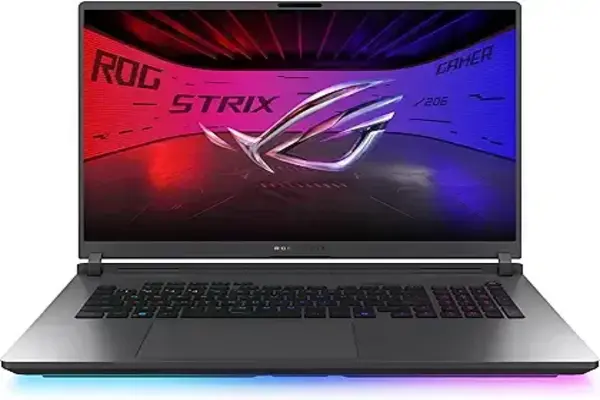
While marketed for gaming, its high-wattage HX-series processors and large cooling fans make it perfect for junior engineers. It offers higher clock speeds for a lower price than “Workstation” branded laptops.
Why we recommend this product: Great price-to-performance for students who need power on a budget.
Specs: ASUS ROG Strix G18 (2025) Gaming Laptop, 18” 16:10 144Hz/3ms, NVIDIA® GeForce RTX™ 5060, AMD Ryzen™ 9 9955HX Processor, 16GB DDR5-5600, 2TB PCIe Gen 4 SSD, Wi-Fi 6E, Windows 11 Home, G814FM-DS95
View at AmazonHP ZBook Ultra G1a (The 14-inch Powerhouse)
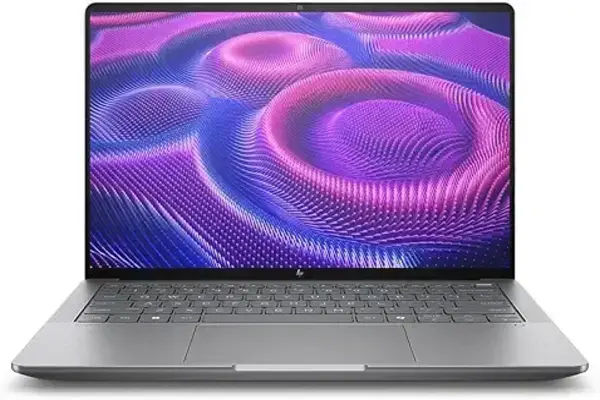
Powered by the AMD “Strix Halo” chip, this is the first 14-inch laptop that truly competes with 16-inch workstations. It’s ideal for civil engineers who are constantly travelling between the office and site visits.
Why we recommend this product: It weighs only 1.57kg but handles 3D road modelling with ease.
Specs: HP ZBook Ultra G1a 14″ Touchscreen Mobile Workstation – 2.8K – AMD Ryzen AI MAX PRO 390-64 GB – English Keyboard – Meteor Silver – Smart Buy – AMD Chip – 2880 x 1800 – Windows 11 Pro – Radeon 8050S
View at AmazonMicrosoft Surface Laptop Studio 2 (The Field Designer)

Its unique “pull-forward” screen makes it the best choice for redlining blueprints or sketching structural details during site meetings.
Why we recommend this: Integrated slim pen support for digital markups in Bluebeam or Revit.
Specs: Microsoft Surface Laptop Studio 2 14.4″ Touchscreen Convertible (Floating Slider) 2 in 1 Notebook – Intel Core i7 13th Gen i7-13700H – Intel Evo Platform – 16 GB – 512 GB SSD (Renewed)
View at AmazonLenovo LOQ 15 (The Budget Entry)

The best entry-level choice for students or small-scale residential drafting. It offers a solid RTX GPU and an upgradeable RAM slot, allowing you to start with 16GB and move to 32GB as your projects grow.
Specs: Lenovo LOQ 15 Gaming Laptop RTX 5050 -Intel Core i5-13450HX Beat Ryzen 7 7435HS -15.6 FHD Display G-SYNC- 32GB RAM -1TB SSD -Backlit Keyboard -2025 Portatil Gamer PC -Windows 11 -Webcam
View at Amazon2026 Hardware Rules for Engineers
When promoting these on WebsiteForEngineers.com through our Deal section, emphasise these three “Golden Rules” to your audience:
- RAM is King: For Revit 2026, 32GB is the floor, not the ceiling. Recommend 64GB for anyone working on collaborative BIM360 projects.
- Clock Speed > Core Count: A 5.0 GHz+ boost clock is more valuable for Revit than 24 cores running at 3.0 GHz.
- NVMe Gen 5: Ensure the laptop supports Gen 5 SSDs. In 2026, the bottleneck for opening huge Civil 3D files is often the drive speed, not the CPU.
FAQs: Engineering Laptops for Civil 3D and Revit
1. Is 16GB of RAM enough for Revit and Civil 3D in 2026?
While 16GB might suffice for small residential projects or basic student coursework, it is no longer recommended for professional use. 32GB is the industry standard for BIM applications. If you handle federated models or use Revit’s real-time rendering features, 64GB is the safest bet to avoid system crashes.
2. Should I prioritise CPU core count or clock speed (GHz)?
For most engineering software, such as Revit and AutoCAD, clock speed is more important than core count. These programs are predominantly single-threaded for daily tasks like model regeneration and line work. Look for a processor that offers a high “Turbo Boost” frequency (above 5.0 GHz) rather than just a high number of cores.
3. Do I really need an NVIDIA RTX “Professional” (Ada/Blackwell) card?
For many tasks, “Gaming” cards (GeForce RTX) work exceptionally well and offer better value. However, Professional-grade cards (RTX Ada/Blackwell) are “ISV Certified” by Autodesk. This means they are specifically tested to prevent visual glitches in high-stakes environments and offer better driver stability for long-term project reliability.
4. Why doesn’t Revit run natively on MacBooks?
As of 2026, Autodesk Revit still lacks a native macOS version. While you can run it via virtualisation software like Parallels or through Cloud Workstations, there is often a performance penalty. For a seamless, high-performance experience, a Windows-based workstation remains the professional choice for Civil 3D and Revit.
5. What is the best screen resolution for CAD work?
While 4K displays offer incredible detail, a QHD (2560 x 1440) or 3.2K resolution is often the “sweet spot” for 16-inch laptops. This provides plenty of workspace for toolbars and blueprints without scaling issues or excessive battery drain. If you work on-site, prioritise a screen with at least 500 nits of brightness to combat glare.
The Final Verdict: Which Laptop Should You Choose?
Investing in a new workstation is one of the most significant career decisions you’ll make this year. The gap between “good enough” and “professional grade” has widened, and for a Civil Engineer or Architect, that gap is measured in hours of saved productivity.
If budget is no object and performance is everything, the Lenovo ThinkPad P16 Gen 3 is the undisputed king. Its ability to scale to 128GB of RAM and its top-tier thermal management make it the safest long-term investment for BIM managers.
Also, if you need a “do-it-all” machine for the office and the site, the ASUS ProArt P16 offers the best balance of modern AI-ready processing and a portable, professional aesthetic.
Furthermore, if you are a student or starting your first junior role, grab the Lenovo Legion 5 Pro. It provides the high clock speeds Revit loves without the “Workstation” price premium, leaving you with extra budget for your software subscriptions or certifications.
For More Drones for Surveying, please visit here. Furthermore, visit our WebsiteForEngineers Deals page for more great news.
Like Our Page on Facebook | Share — to educate another engineer today!